MT Manager APK Free Download – Latest Version For Android
Need a better way to manage files and Android apps? MT Manager APK brings useful file management and APK-related tools together in one app. You can use it to organize files, work with supported archives, and inspect Android application resources such as XML and DEX files. The app is useful for both regular file tasks and more advanced Android work.
App Name
Mt Manager
Size
34.83 MB
Latest Version
2.26.10
Android Required
5.0+
MT Manager APK Information
Looking for an earlier release? You can also check MT Manager Old Version to find previous versions and choose one that better matches your Android device.
| Information | Details |
| Latest Version | 2.26.10 |
| Release Date | September 11, 2026 |
| APK Size | 34.83 MB |
| Android Required | Android 5.0 or higher |
| Developer | Lin Jin Bin |
| Platform | Android |
| Category | File Manager & APK Tools |
What Is MT Manager APK?
MT Manager is designed for Android users who need more control over files and application packages than a basic file manager normally provides. You can use it to browse folders, manage files, work with compressed archives, and inspect the contents of supported APK files from the same interface.
Its more advanced tools are useful when working with Android application resources and other technical files. For example, users can work with supported XML, DEX, and resource files when examining an APK. These functions are more suitable for users who already understand how Android applications are structured, while basic file management can be used without that technical background.
Main Features of MT Manager
MT Manager combines everyday file management with tools for working with Android application files. Its main features are useful for both regular file tasks and more technical APK-related work.
File Manager
MT Manager lets you browse and organize files and folders directly on an Android device. You can copy, move, rename, delete, and manage files from its file management interface. It also provides access to different storage locations, depending on the permissions available on the device.
APK Editor
The APK editor allows users to open supported APK files and inspect their contents. Depending on the file and the task, users can work with application resources, configuration files, and other editable components. APK editing is more suitable for users who understand the basic structure of Android applications.
Text & Code Editor
MT Manager includes an editor for viewing and modifying text-based files. Its syntax highlighting makes supported code and configuration files easier to read, while newer versions also improve code-related viewing features.
ZIP & Archive Manager
The app can work with common compressed archives, allowing users to view and manage files inside supported archive formats. This is useful when files need to be extracted, added, moved, or organized without switching to another file manager. Compare with best file MT Manager vs ZArchiver.
XML, DEX & ARSC Tools
MT Manager provides tools for working with common Android application components such as XML, DEX, and ARSC files. These tools are mainly useful when inspecting or editing APK resources and require some understanding of Android app structures.
Root & System File Access
Basic file management does not require root access. On rooted devices, MT Manager can provide access to areas and operations that are normally restricted by Android. What you can access or modify still depends on the device, Android version, permissions, and root setup.
How to Download MT Manager APK
Downloading the MT Manager APK is simple when you use a compatible APK file and check the version before installing it. Android may show a security warning when an app is installed outside the Play Store, so make sure you understand where the file comes from.
Check the APK Details
Before downloading, check the MT Manager version, file size, and Android requirement. For the current release, make sure your device meets the required Android version.
Download the APK File
Tap the download option for the MT Manager APK and wait for the file to finish downloading. Keep enough free storage available on your device so the download and installation can complete properly.
Check the Download File
After the download finishes, open your device’s Downloads folder and locate the APK file. If the file appears incomplete or Android reports a problem with the package, download a fresh copy before trying to install it.
How to Install MT Manager APK on Android
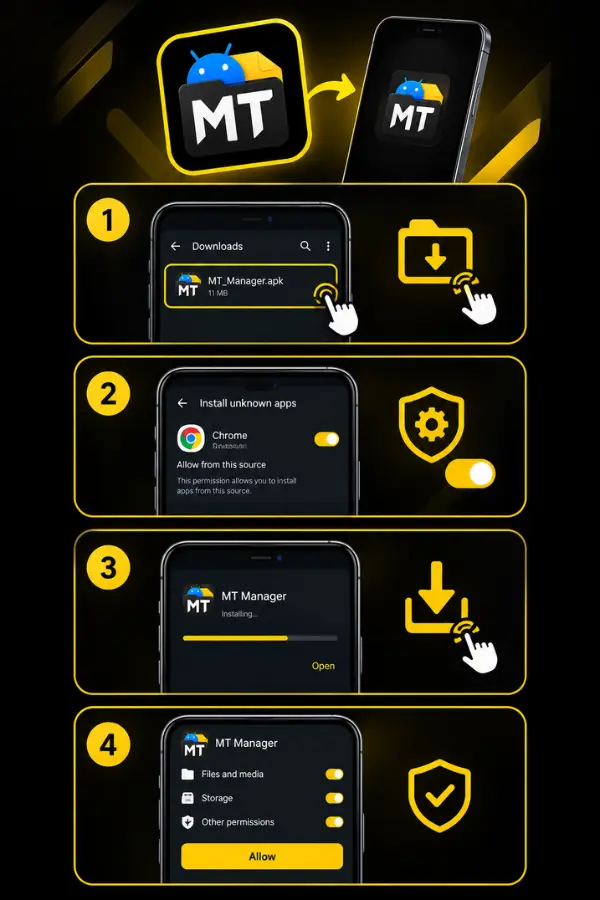
Once the MT Manager APK has finished downloading, you can install it directly on your Android device. The exact permission options may differ slightly depending on your Android version and device manufacturer.
Open the APK File
Go to your Downloads folder and tap the MT Manager APK file. Android will open the package installer and check the file before installation.
Allow APK Installation
If Android blocks the installation, open the security settings shown in the warning and allow your browser or file manager to install apps from that source. You may need to enable this permission only for the app you used to open the APK.
Install MT Manager
Return to the APK file and tap Install. Wait for Android to complete the installation, then tap Open to launch MT Manager.
Give Required Permissions
When MT Manager requests access to files or storage, review the permission and allow it if you want the app to manage files on your device. Only grant permissions that are necessary for the tasks you want to perform.
How to Use MT Manager
MT Manager can be used for simple file management as well as more advanced Android file and APK tasks. The best approach depends on what you want to do with the app. If you want to use MT Manager on a larger screen, you can also learn how to run MT Manager on a PC using an Android emulator.
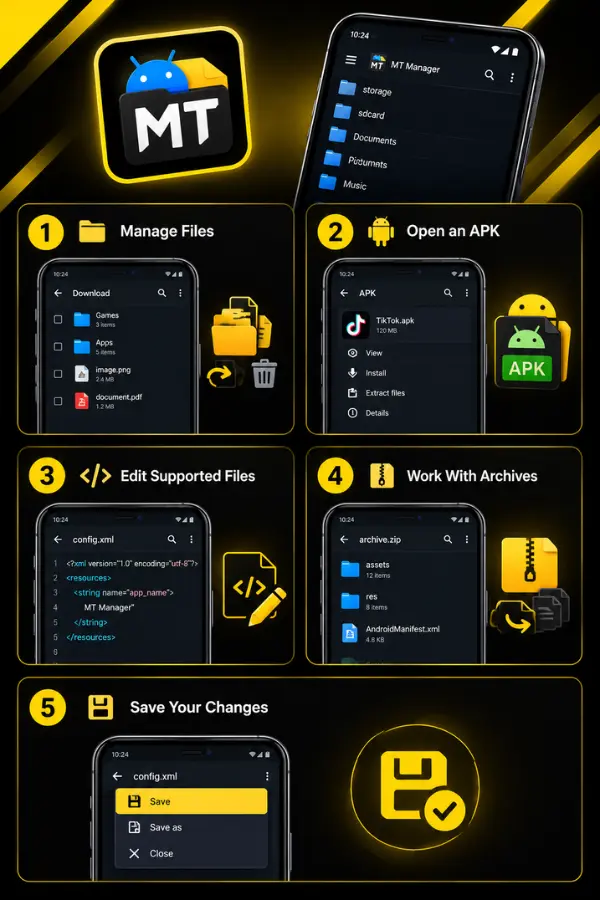
Manage Files
Open MT Manager and browse to the folder containing the files you need. You can select files to copy, move, rename, delete, or organize them into different folders.
Open an APK
To inspect an APK, locate the file in MT Manager and open it with the available APK-related options. You can then browse its supported files and resources without needing a separate file manager.
Edit Supported Files
If you need to modify a supported text, XML, or resource file, open it with the appropriate editor or tool. Make changes carefully and keep a backup of the original file before editing important application data.
Work With Archives
For compressed files, open the archive in MT Manager and use the available options to view or manage its contents. This can be useful when you need to move or extract files without using another archive application.
Save Your Changes
After making an edit, save the file and check that the resulting file works as expected. When working with APKs, some changes may require additional steps before the application can be installed or run correctly.
Is MT Manager APK Safe?
MT Manager is an Android file management and APK-related tool, but its safety also depends on where you get the APK and what permissions you give it. The official MT website provides its own download and release information, so checking the version and source before installation is a good practice.
MT Manager may request storage access because file management is one of its core functions. Its official privacy policy also explains permissions related to installed-app lists, APK installation, clipboard access, and other features. You should review these permissions and only enable access that you are comfortable with.
Tips for Using MT Manager Safely
- Download the APK from a source you trust.
- Check the version before installing.
- Keep a backup before modifying important files or APKs.
- Avoid changing system files unless you understand their purpose.
- Do not give root access to unknown or untrusted applications.
- Keep Android and your security tools updated.
MT Manager APK Not Working
If MT Manager is not working properly, the cause may be related to the APK file, Android version, permissions, storage, or a specific file you are trying to open.
MT Manager APK Is Not Installing
Check that your Android version meets the app’s requirements and that you have enough free storage. If Android reports that the package cannot be installed, try downloading a fresh APK file.
MT Manager Keeps Crashing
Restart your device and open MT Manager again. If the problem continues, check the app’s permissions and make sure you are using a compatible version. A problem with a particular file can also cause the app to close unexpectedly.
MT Manager Cannot Access Files
Check the permissions granted to MT Manager and make sure it has the access required for the storage location you are trying to use. Android restrictions may also limit access to certain folders.
MT Manager Cannot Open an APK
If a specific APK does not open correctly, the file may be incomplete, damaged, or incompatible with the available tools. Try checking another APK to determine whether the problem is with the app or the file.
MT Manager APK Pros and Cons
MT Manager combines file management with tools for working with Android application files. This makes it more capable than a basic file manager, but some of its advanced functions may feel complicated for new Android users.
Pros
Cons
Frequently Asked Questions
Final Words
MT Manager is a useful Android tool for users who want more control over their files and supported application packages. It combines everyday file management with advanced tools for working with Android files, making it suitable for both basic and technical tasks.
Before installing MT Manager APK, check the version, Android compatibility, and source of the file. If you need more detailed help, you can follow the dedicated guides for downloading, installation, troubleshooting, iOS, and PC use.